
Intro
Most application programming done in University takes a focus on functionality but not scalability. Being a recent computer science graduate, I found that we have not been exposed much to real-time data exchanging applications, only simulations. This is why diving into Kafka was a great experience and has shown me just how powerful it can be.
A basic understanding of Java is needed to understand the Kafka Java APIs. I had to brush up on my OOP concepts when starting.
Apache Kafka
Nowadays it is necessary for nearly every company to have a means of collecting and exchanging data. Apache Kafka is a data pipeline which is used for real-time data exchange, and it is one of the fastest at it. It is an open source product which was first developed for LinkedIn to track user activity across the website. It was then sold to Apache in 2011. The difference between Kafka and other similar architectures is that Kafka was built from the ground up to handle billions of events.
Event Streaming
This article will focus mainly on the messaging system of Kafka which is just a general start. Kafka is helpful in recording when something happens in the real world. These are the main features:
1. You can send and receive messages (or events) via producer and consumer.
2. You can store events for as long as you need.
3. Data can be streamed in real-time or offline.
An event is the record of anything happening. For example, a payment made, an action in a game, or a link was clicked. The producer is the entity which publishes and sends records, while the consumer is the entity which consumes the records.
The Process
Kafka uses a publish-subscribe based message system to exchange data between processes, applications, and servers. The following image represents an application (the producer) which transfers a record to the topic. Another application (the consumer) then processes the record from the topic. (Partitions will be talked about in a future post, don’t worry!)

“Courtesy: https://www.cloudkarafka.com/blog/2016-11-30-part1-kafka-for-beginners-what-is-apache-kafka.html“
Records are published and stored via the Topic, which can basically be thought of as a category for anything you are recording. The scalability of Kafka makes it a great fit for all kinds of data. It is used heavily in the big data space but also is used for micro servers and smaller data sizes.
Setting up Kafka
1. Download Kafka
$ tar -xzf kafka_2.13-2.6.0.tgz
$ cd kafka_2.13-2.6.0
2. Start Kafka
# Start the ZooKeeper service
# Note: Soon, ZooKeeper will no longer be required by Apache Kafka.
$ bin/zookeeper-server-start.sh config/zookeeper.properties
# Start the Kafka broker service
$ bin/kafka-server-start.sh config/server.properties
3. Create a topic to store events
$ bin/kafka-topics.sh --create --topic quickstart-events --bootstrap-server localhost:9092
4. Write some events into the topic via Producer
$ bin/kafka-console-producer.sh --topic quickstart-events --bootstrap-server localhost:9092
This is my first event
This is my second event
5. Read events via Consumer
$ bin/kafka-console-consumer.sh --topic quickstart-events --from-beginning --bootstrap-server localhost:9092
This is my first event
This is my second event
Code Sample (full code at the end of post)
The producer and consumer run as 2 separate entities. Here is a code sample for each of them.
kafkaProducer = new KafkaProducer(properties);

    public void sendStuff(String topic, String key, String value) {
        ProducerRecord producerRecord = new ProducerRecord(topic, key, value);
        kafkaProducer.send(producerRecord);
    }

    public void close() {
        kafkaProducer.close();
    }
public void receive() {
    KafkaConsumer<String, String> consumer = new KafkaConsumer<>(props);
    consumer.subscribe(Arrays.asList(topicName));

    while (true) {
        ConsumerRecords<String, String> records = consumer.poll(100);
        for (ConsumerRecord<String, String> record : records)
            System.out.printf("offset = %d, key = %s, value = %s%n", record.offset(), record.key(), record.value());
    }
}
Sample Run
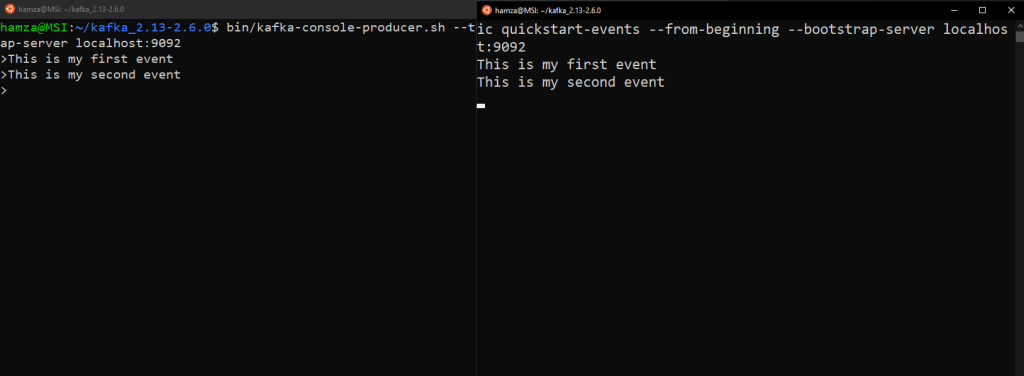
Here we can see the producer on the left side sending messages to the topic. The consumer on the right side then will connect to the application and read those messages from the topic, then display them.
Source Code
The producer-consumer project can be found at: https://github.com/creatosix/kafka-sandbox
 creatosix.com