
Developing a multi-layered web application is a great way for anyone who wants to get into development to try out different frameworks and see how they work with each other.
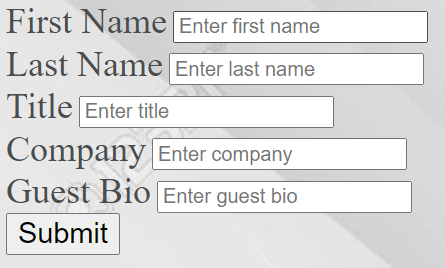
In the last post we talked about how Kafka can be used as a message subscribe system for handling data. Today we will add on to that project by setting up a web service that acts as a Kafka producer. We’ll use Spring Boot to create that web service. A consumer will listen for data and publish to a database (we’ll use MySQL). Finally, we’ll create an HTML page with a basic form for inputting fields. We’ll use that form to submit data to our web service.
The skills I recommend to brush up on are Java OOP concepts and basic SQL. Taking a course on Spring would also be helpful.
The Moving Parts
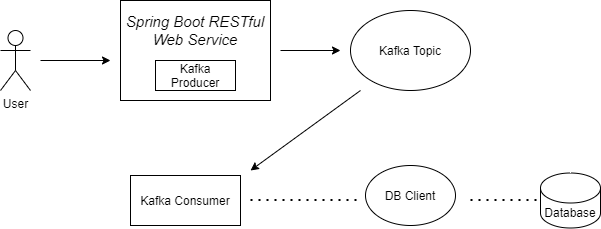
Here is a diagram for the application we will be creating.
Entity POJO
The data we will be receiving will be an entity to our database for a guest. The Guest entity will have different fields for their first and last name, ID, company, and bio.
We will be using the Spring framework for our Java code. One benefit of Spring is that we will have support for dependency injection whereby we can auto wire our project dependencies, which will greatly help simplify things. It also will help us directly connect to our SQL database. We will create 2 Java classes: one for the producer and one for the consumer.
Kafka Producer
In our producer, we created a REST controller to send data over HTTP. This program also creates our Kafka producer and topic. The Spring KafkaTemplate class lets us do this.
@RestController
 @RequestMapping("/api/v1/guest")
 public class GuestController {
     @Autowired
     KafkaTemplate<String, Guest> kafkaTemplate;

     @RequestMapping(consumes = { MediaType.APPLICATION_FORM_URLENCODED_VALUE})
     public void postMessage(Guest guest) {
         kafkaTemplate.send("quickstart-events", guest);
     }
 }
Kafka Consumer
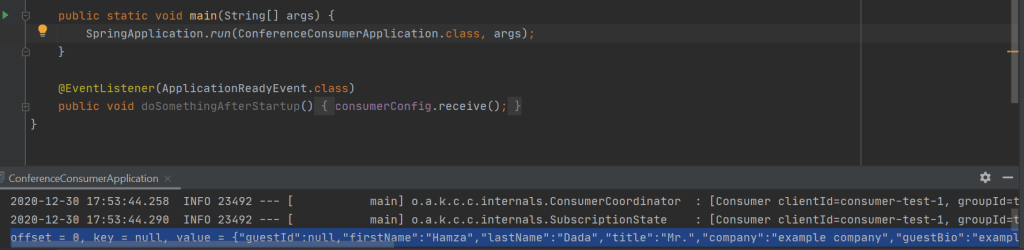
The consumer program connects to our Kafka topic and listens for incoming data, it will then publish this data to our MySQL database.
Database
The application.properties file will contain code like this.
spring.datasource.url=jdbc:MySQL://localhost:3306/sys
spring.datasource.username=root
spring.datasource.password=*****
spring.jpa.database-platform=org.hibernate.dialect.MySQLDialect
spring.jpa.hibernate.dll.auto = none
spring.jpa.hibernate.show-sql=true
If we decide to change our data source from MySQL to something else (like PostgreSQL) we just have to update our connection properties in application.properties.
Testing the API
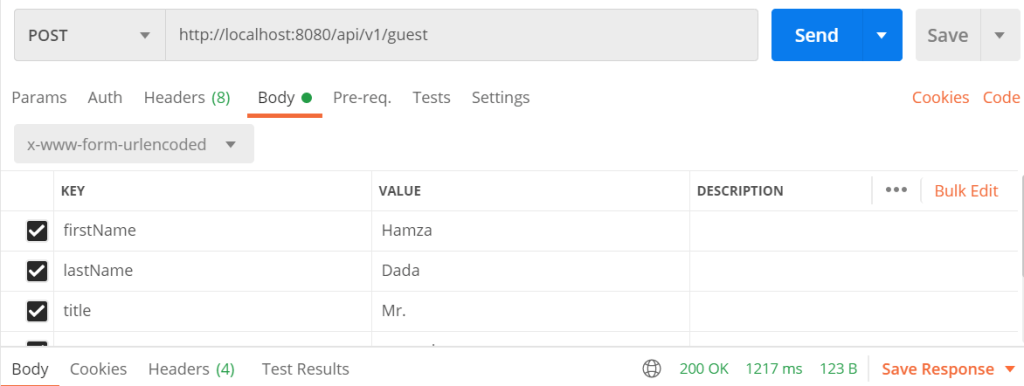
I tested the web service using Postman (download it, it’s free and awesome!) which helps us test our APIs. This is done by allowing users to create and save HTTP requests and see the results. Here is a screenshot of a request submission and response in Postman.
Form Input
Codebase
Full code can be found here: https://github.com/creatosix/spring-boot-application
 creatosix.com
Excellent! That is very impressive.
LikeLike